
How Often Does PQAI Surface Prior Art in Invalidity Searches? A Benchmarking Study
In one of our earlier articles, we shared how PQAI can be used for invalidity searches. A little before that, we had also conducted a


PQAI is a popular tool among inventors for conducting novelty searches. You can describe an invention in plain language, and its semantic search capabilities can help surface earlier patents and technical literature that may be worth investigating. That’s also why top organizations use the PQAI API to embed its novelty search capabilities into their own products.
However, PQAI can also come in handy when you are trying to investigate the validity of an already-granted patent. That may be during IPR preparation, PGR research, litigation, reexamination, or another invalidity analysis.
Of course, invalidity searches are high-stakes, and you are looking for earlier disclosures that may address the limitations of a particular patent claim. That usually means reviewing prior art closely, comparing technical language, following related references, and eventually deciding which documents deserve deeper claim analysis.
However, PQAI can help patent analysts make the search and screening part of that process easier. So, how do you use it?
Let us show you using a real patent that was challenged and for which prior art had already been identified through a public challenge. We are referring to US10404366B2 here, which is assigned to Radiant Patents and was one of two patents the company asserted against Nokia.
An invalidity search usually starts with the claim you are investigating.
For this example, we pasted Claim 1 of US Patent 10,404,366, titled “Optical signal monitor, optical wavelength multiplexing transmitter, and method for monitoring optical signal in PQAI.
To give some quick context, the patent concerns monitoring optical signals in wavelength-division multiplexed communication systems and controlling dummy light based on monitored optical intensity.
To start our search, we copied Claim 1 exactly as granted into PQAI.
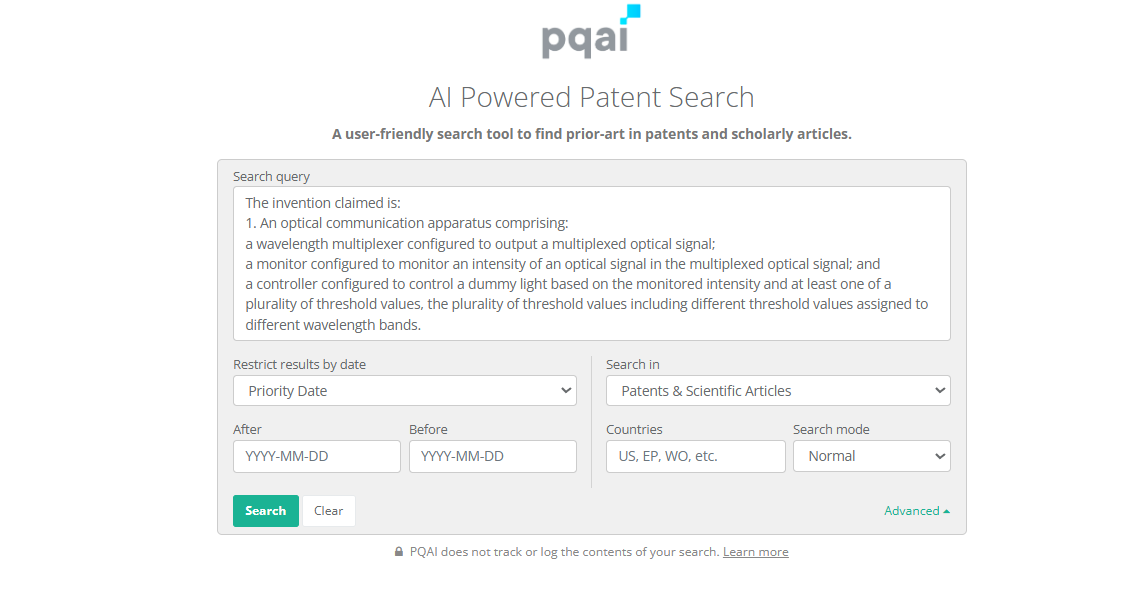
The beauty of PQAI is that you do not need to convert the claim into complex Boolean strings or keyword combinations before searching. You can paste the claim you want to investigate directly into the search interface and let PQAI use its semantic search to identify potentially relevant patents and technical literature.
But before we hit Search, there is one more field worth getting right: the date.
PQAI lets you restrict results by date, including Priority date, filing date or publication date. For this invalidity search, we selected the priority date
While US10404366B2 was filed as the current US application in 2018, its priority chain goes back to March 4, 2015 through JP2015042535. That is the date we entered in the “Before” field.
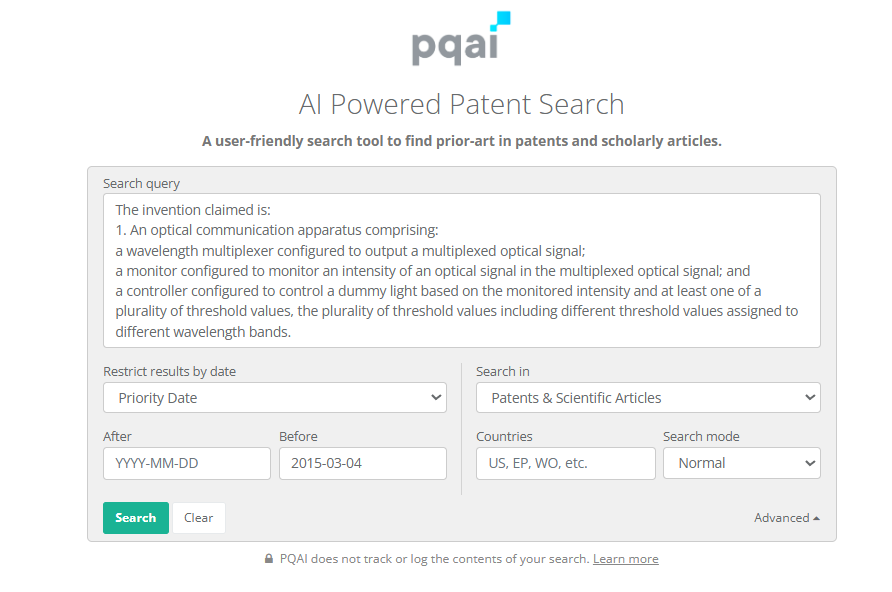
Timing matters in invalidity searches more than ever as you are not simply looking for patents that describe similar technology. You are looking for disclosures that were available early enough to be potentially relevant prior art.
For an actual invalidity matter, the appropriate cutoff date and priority entitlement should be confirmed for the specific claim. That’s why, for this example, we used the patent family’s earliest claimed priority date, March 4, 2015, as our search cutoff.
What next? Hit Search.
Once you hit Search, PQAI can surface anywhere from 100 to 500 results in the interface that are semantically related to the claim. As a patent analyst, it now falls on you to review the results individually and examine where there may be a meaningful match.
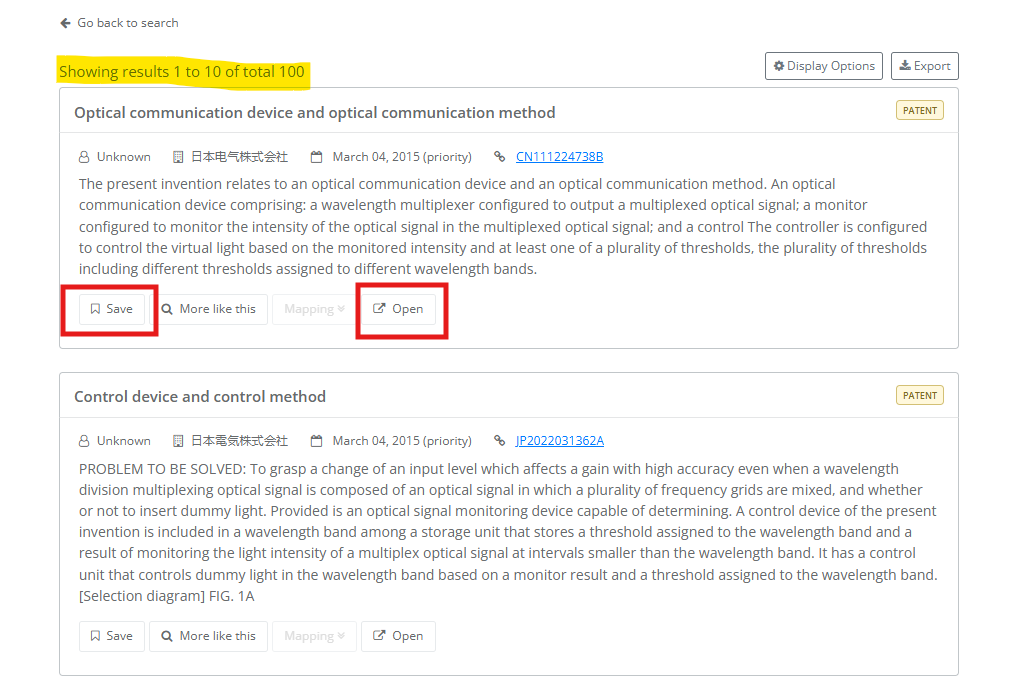
To understand how each patent or NPL semantically relates to your claim, you can click on the Mapping feature to see how PQAI maps the reference to the claim you entered.
If a patent seems like the right match and you want to explore it further, you can click “Open” to view the patent in a new tab. If you would like to save the patent for a more detailed review later, you can click the “Save” button. The reference will then be saved so you can return to it later or download it as a PDF.
When going through these results, by result number 7, we came across a patent with clear technical overlap with the claim in US10404366. We clicked on the Mapping feature to understand why PQAI had surfaced it and whether it was worth exploring further.
US8805185 describes a wavelength-division multiplexing transmission device with a monitoring unit, a dummy-light source, and a controller that can cause dummy light to be emitted when the monitored optical level indicates an interruption.
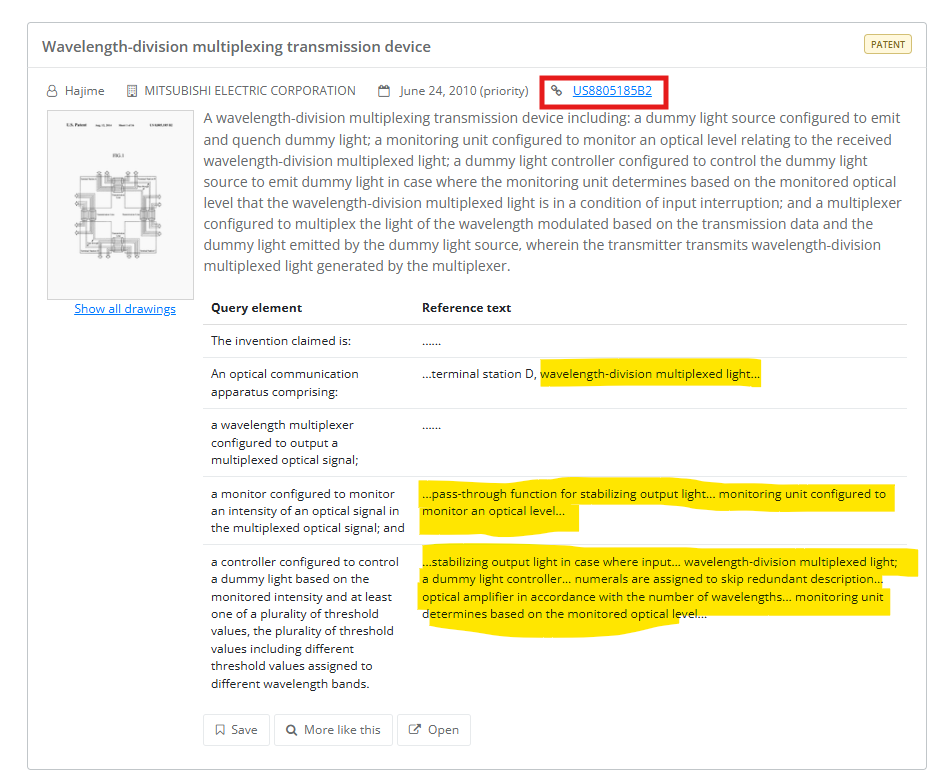
Its priority date is June 24, 2010, and it was granted in 2014, both before the March 2015 priority date we used for the subject patent.
The subject claim we shared discusses monitoring optical intensity and controlling dummy light based on that monitoring. This reference also discusses monitoring an optical level and controlling dummy light in a wavelength-division multiplexing system.
The mapping made that connection easier to inspect. For the claim element covering a monitor configured to monitor the intensity of an optical signal, PQAI pointed to text describing a “monitoring unit configured to monitor an optical level.” For the controller element, it highlighted passages discussing a dummy-light controller, monitoring based on optical level, and controlling output light when an interruption is detected.
The mapping by itself does not establish that the reference satisfies every limitation of the claim. But it gave us enough technical overlap to treat US8805185 as a lead worth investigating more closely in the full patent. When our research analyst team explored this reference in detail, they confirmed that the patent, in fact, qualified as a prior art reference for US10404366B2.
We believe a promising reference can also become the starting point for another search. Once we had identified US8805185B2 as a strong lead, we wanted to see what else PQAI could surface around that reference. So, underneath the patent, we clicked on “More like this.”
PQAI returned 99 related results. Interestingly, the first result was EP2587701A1, the European publication from the same patent family as US8805185B2. Another family member, CN102959887B, also appeared further down the result set. Both of these publications are equivalents of US8805185B2.
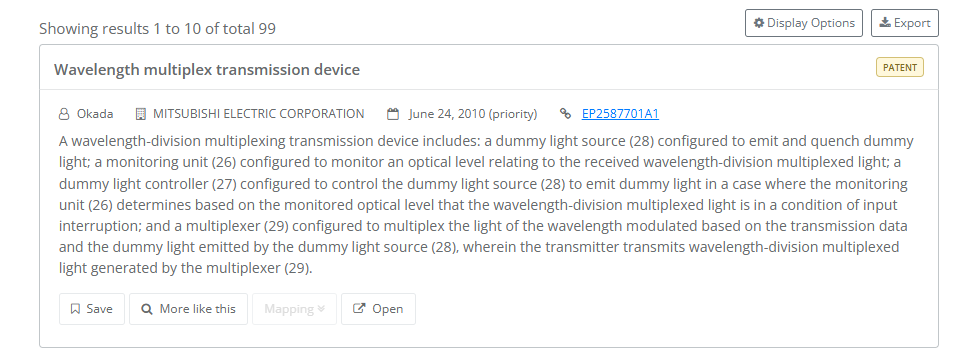
From there, the results branched into other patents dealing with closely related concepts such as wavelength-division multiplexing, optical transmission monitoring, output-level control, and dummy-light management. For example, US8401386B2, was one of the references that appeared near the top of the result set.
The patent uses wavelength-selective switches, a monitor, and a controller to check whether a wavelength is already present in a multiplexed signal and then decide whether that light should be transmitted. There was an important difference, though. Unlike the subject patent claim, this reference does not use the same dummy-light and threshold-value mechanism. So, we did not take this particular reference any further in our analysis.
We stopped our analysis here. However, this feature can still be useful during an invalidity search. A promising patent can become another entry point into the prior-art landscape, allowing analysts to check family members and investigate nearby disclosures that use similar technical concepts.
Out of curiosity, we also checked the results of the April 2026 Unified Patents PATROLL prior-art challenge involving US10404366. The winning submissions were:

Source – Unified Patents
That made the result even more interesting. US8805185 had surfaced at rank 7 in our PQAI search; our research analyst had independently identified it as a relevant prior-art reference, and it turned out to be one of the winning prior-art submissions against the same patent.
This is not the first time we have seen this happen either. In our previous PQAI benchmark for prior art search, the tool also surfaced references that had independently been identified by expert searchers.
Plus, the workflow is fairly simple. To start an invalidity search, you can open the PQAI search interface, paste the claim you are investigating, add the relevant priority date, and begin reviewing the results. From there, Mapping and “More like this” can help you investigate promising references and follow useful prior-art trails.
PQAI does not replace the detailed analysis done by an expert required to determine whether a reference actually satisfies the relevant claim limitations. But it can give patent analysts a practical starting point for finding and screening potentially relevant prior art.
Want to try it with a patent you are researching? Start a PQAI search for free today.

At PQAI, we bring clarity to the world of patents. Through storytelling and insight, we simplify inventions so innovators, researchers, and businesses can learn from the past and build the future.
In one of our earlier articles, we shared how PQAI can be used for invalidity searches. A little before that, we had also conducted a
People ask us a version of the same question all the time. How good is PQAI, really? It is a fair question, and a hard

TL;DR: A patent research firm serving enterprise clients was receiving between 80 and 120 search requests every month. As its client base grew and new